

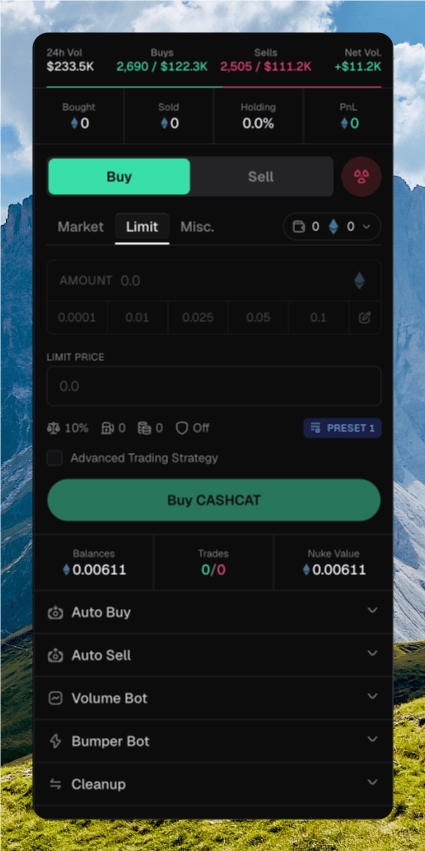
The trade sidebar sits on the right of every token page. It is the form for a market buy or sell across the wallets you have selected.
Trade sidebar on CASHCAT with Buy selected, amount chips, Preset 1, Buy CASHCAT, and Auto Buy through Cleanup below

The sidebar with Bought / Sold / Holding / PnL, Buy selected, amount, presets, and the submit button

Placing a trade

1

Pick a side

Click Buy or Sell, or press B / ⇧ S. Stay on Market.
2

Select wallets

Open the wallet picker. Chipper trades from every wallet you check.
3

Set the amount

Type an amount, or click a preset chip. Press 1–9 to apply a chip by position. Press U to switch native and USD.
4

Submit

Click Buy or Sell , or press ⌘ Enter. Several wallets append · N wallets.
The sidebar does not ask you to confirm a market trade. Instant Trade only affects wallet-row chips. Click Bought, Sold, or PnL to switch native and USD. Click Holding to switch USD and supply percent. On Robinhood, the app header sets the trade quote: ETH or USDG. USDG buys and sells use USDG. They do not size from ETH balance.

Selecting wallets

The wallet picker shows how many wallets are selected, plus their native balance. If you are trading a quote token, it shows that balance too.
  • Select All / Unselect All
  • Select All with Balance / Unselect All with Balance
  • Per-wallet checkboxes. The developer wallet shows a Dev badge.
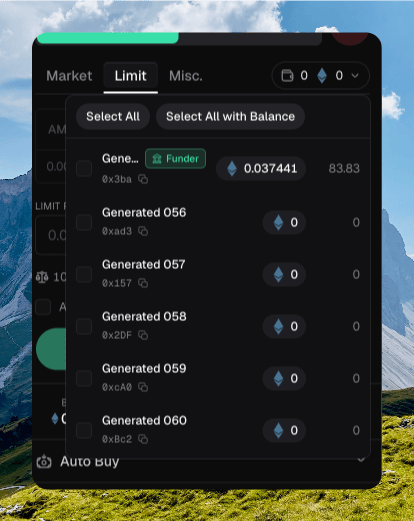
Wallet picker open on the trade sidebar with Select All, Select All with Balance, a Funder wallet, and generated wallets

The wallet picker open, with Select All and wallets listed

Selecting the developer wallet asks Select developer wallet? Trading from it can expose or dump the supply. Check Do not show again to skip that dialog on this device.

Slippage and execution

The row under the amount opens Trading Settings. Those values come from the active trading preset.
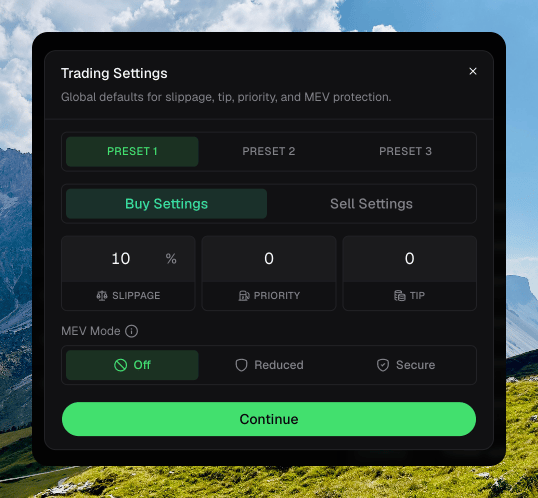
Trading Settings dialog on Preset 1 Buy Settings, with 10% slippage, priority and tip at 0, and MEV Mode Off

Trading Settings on Preset 1, Buy Settings

Buy and sell store their own values. Switch presets with ⌥ 1–3, the footer chip, or the preset chip on this row. See Trade Settings for the amount chips.

Reading the result

Chipper toasts as the trade lands.
  • Submitting trade… while it goes out.
  • Trade submitted with an estimated fill. Several wallets show {submitted}/{total} trades submitted.
  • Buy confirmed or Sell confirmed when the fill lands. Failures toast Trade failed or Trade reverted.
Confirmed trades appear on Trades, Activity, and the wallet row.

Other sidebar actions

The bottom row has Balances, Trades, Nuke Value, and Creator Fees when the protocol supports them. Nuke sells the attached wallets in one action. It is available on BNB and Robinhood, not Solana. The dialog can include the developer wallet and a single transaction. Hold to confirm. This cannot be undone. Misc. is Lock and Burn. Press ⇧ M.