

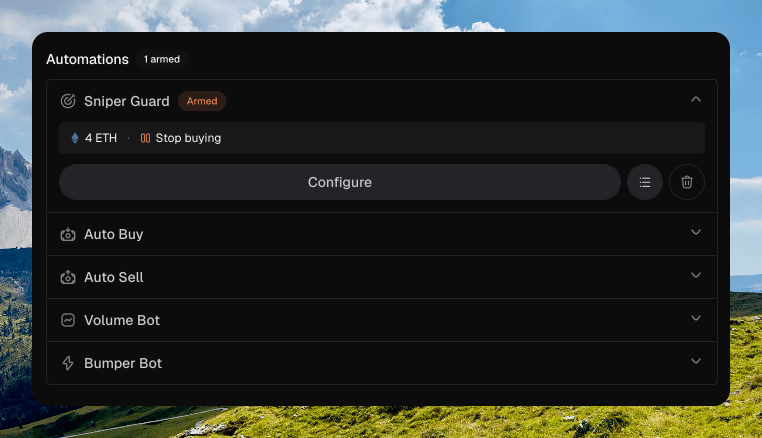
Sniper Guard watches external wallets during a launch. When their combined buys pass your threshold, it stops your buying or sells your position. You arm it on the Automations step. It does not appear on a live token page.
Launch Automations step with Sniper Guard expanded, Armed badge, 4 ETH Stop buying summary, and Configure

Automations with Sniper Guard armed

What it does

Max external is a global cumulative threshold across every external wallet. It is not per wallet. The default is 4 in the quote token. When that total is hit, Trigger mode runs:
  • Stop buying stops further launch buys. This is the default.
  • Sell all exits the position.
Click Configure to open Sniper Guard. The primary button reads Done · Stop buying or Done · Sell all.

Snipe tax

Some protocols apply a snipe tax on opening buys. The launch strategy chart shows the decay and how many of your launch buyers are exempt. That tax is a protocol rule. It is not Sniper Guard. See Launch.

Exemption slots

Launch buyers can consume fixed exemption slots on protocols that have a snipe tax. Chipper shows that on the strategy chart. Sniper Guard does not allocate those slots.

Whitelists

Dev, funder, and launch wallets are excluded automatically. They do not count as external. Whitelist adds extra addresses that should not count as external. Paste a Wallet address and add it. The armed summary shows WL when the list is not empty.

Keep developer wallet

Sell all adds Keep developer wallet. It is on by default. The copy reads Exclude the developer wallet from the sell-all exit. The armed summary shows Keep dev.

Instances

An armed row shows the threshold, the trigger, optional Keep dev, and optional whitelist count. The badge is Armed. Reuse past preset opens Sniper Guard presets. Applying a preset fills the sniper fields. Whitelist entries stay as they are. See Presets. Delete Sniper Guard config disarms it and resets the fields.